Here you will find some usability suggestions for the payment flow with Pix. If you need any Pix assets, please contact us in this form.
Introduction
Pix is becoming one of the greatest and essential payment methods in Brazil's history. It is easy and fast to use and is loved by many Brazilians. Thinking of the best user experience for all stakeholders, the EBANX Product Design Team recommends some good practices in the usage flow of Pix.
Understanding Pix concept
Pix is a new Brazilian electronic payment method. Created by the Brazilian Central Bank (BCB), it allows making any payment or transfer between accounts in a few seconds, without restrictions on the date and time to make them.
In this article, you will find the determinations requested by the Brazilian Central Bank as minimum usability requirements, as well as some suggestions from the design team to improve the users' experience in Pix transactions. You can see mandatory points tags (such as minimum requirements) and other suggestions to improve the user flow.
Feel free to use it on any page of your company.
The Pix payment in your website
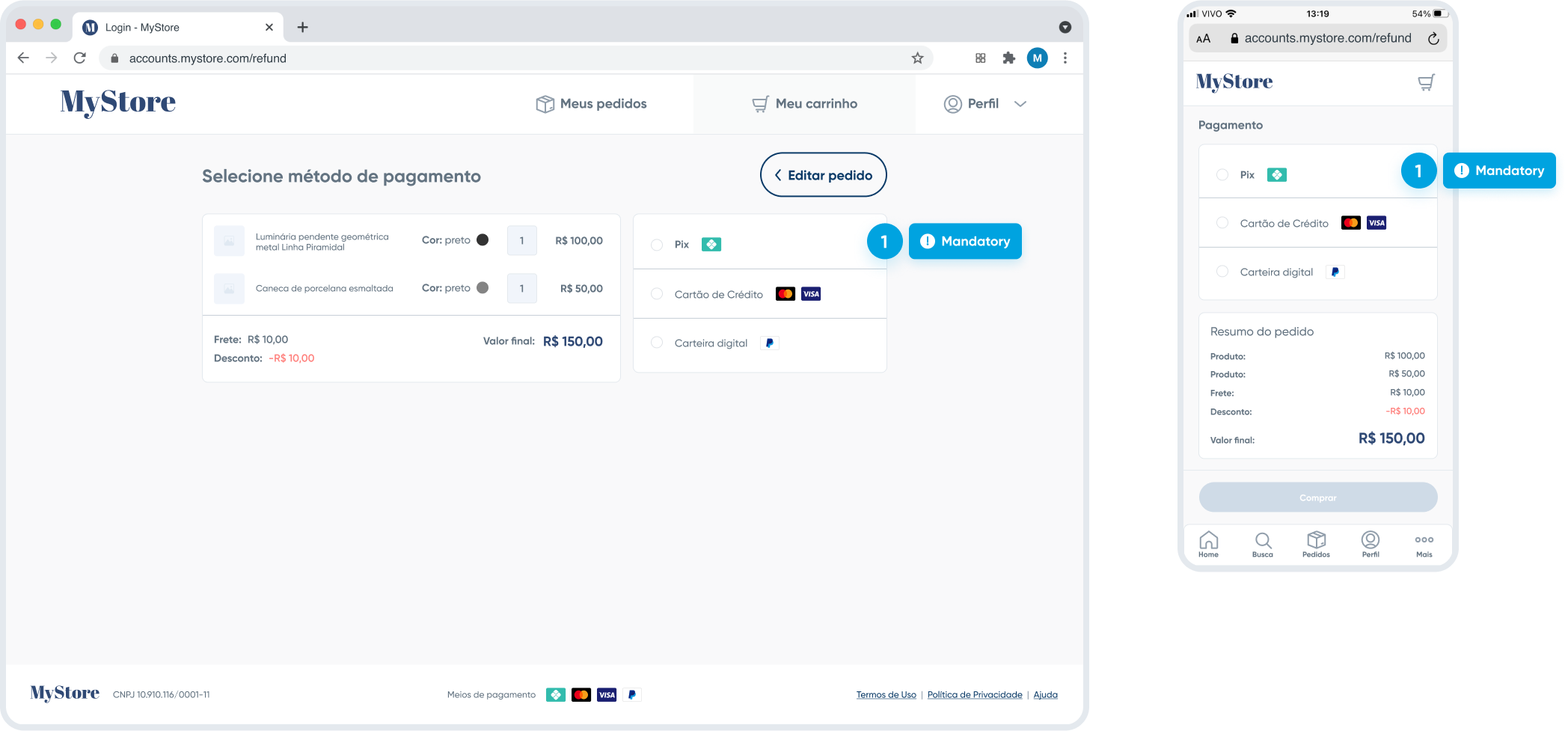
First of all, when you integrate the Pix payment method, at all times that other methods appear or are explained on your website, Pix must appear with the same weight and relevance. This is a mandatory BCB rule and applies both to informative banners and footers, as well as to payment method explanation pages. You can see the example in the templates below:


Remember the correct way to write Pix: in all written texts, the first letter needs to be capitalized and the others lowercase. You can see more about it in Pix Brand Guide Recommendations.
The Pix payment transparent checkout flow
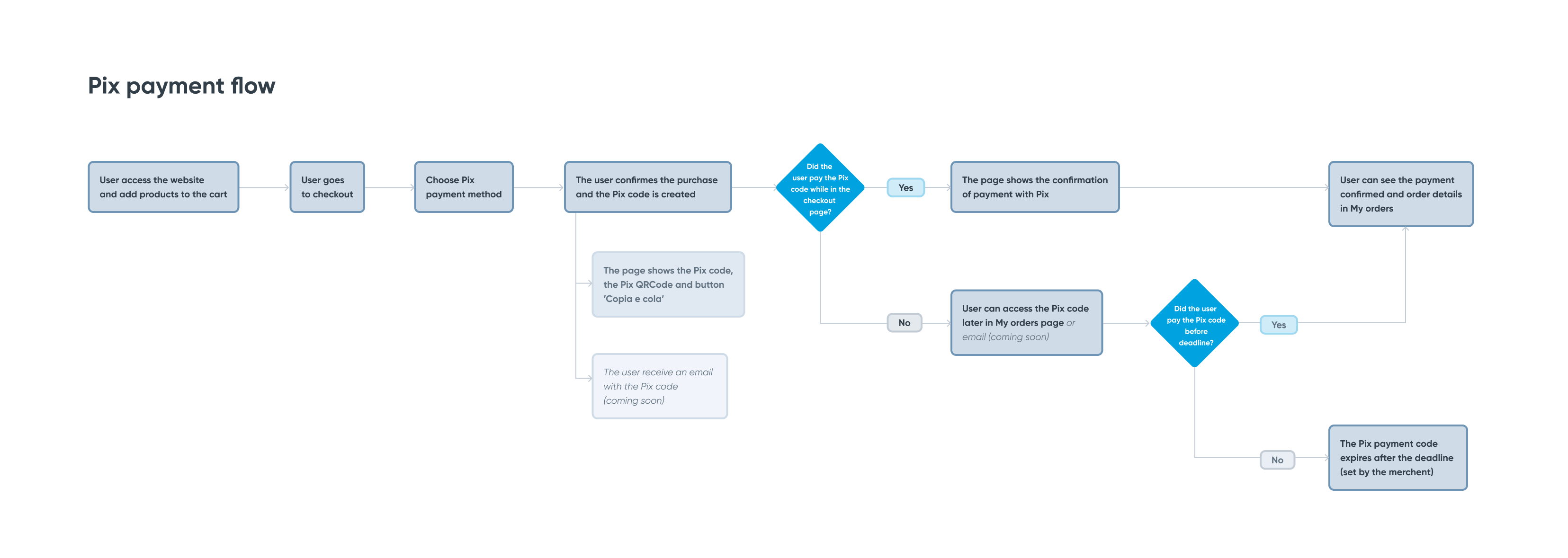
To recommend a good Pix experience flow we simulated a transparent checkout, when the checkout is integrated with EBANX via API. In this case, the entire flow appears on your website to the user.
When a user has finished choosing products from your website and goes to the shopping cart to select the payment method, the Pix payment must be present with the same relevance as the other methods.

When Pix is chosen as a payment method, it is good practice to show a brief explanation of how Pix works. Here you can also inform the user of the payment deadline and highlight the payment processing time, which is instantaneous.
.png)

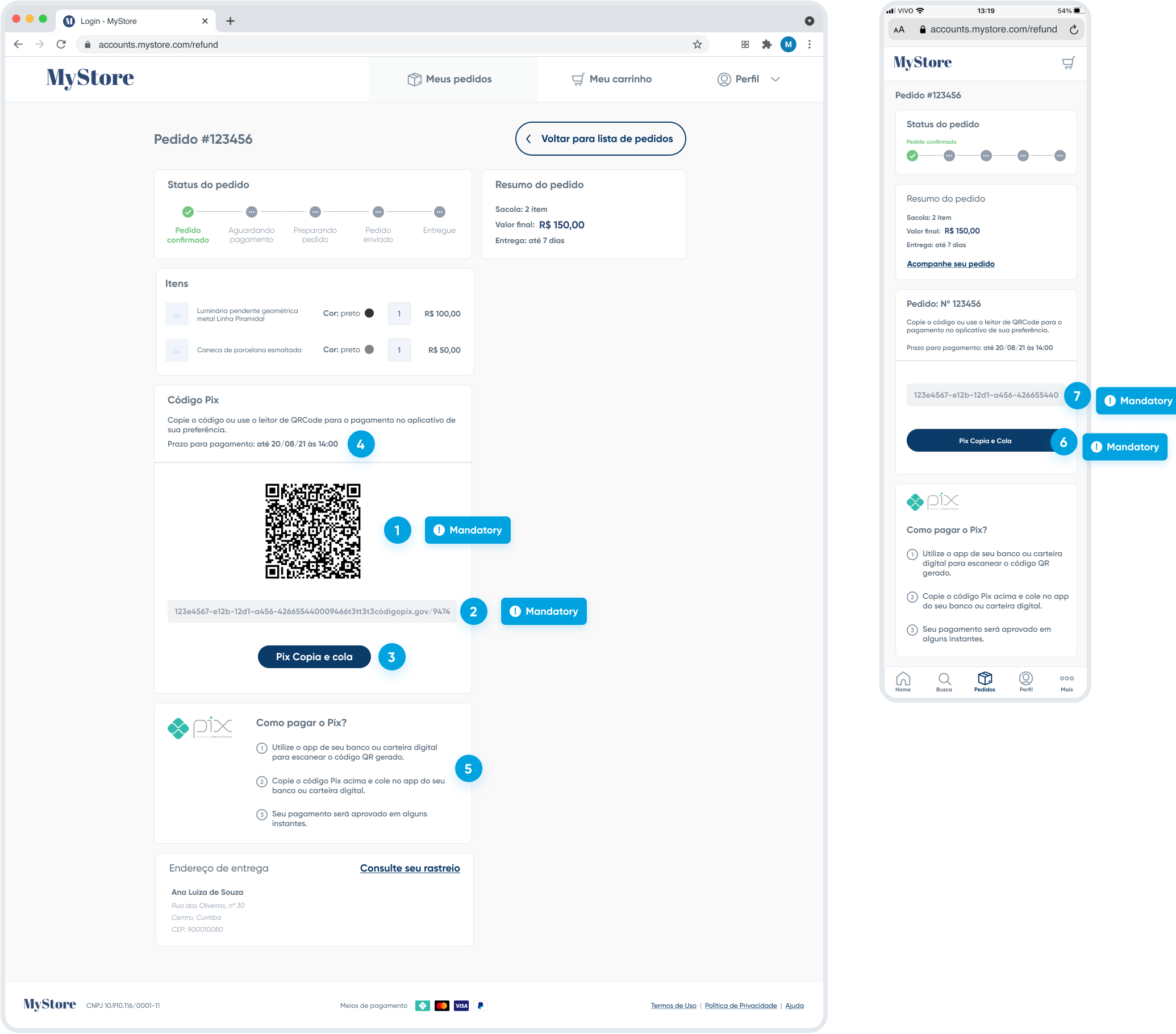
By finalizing the purchase with Pix as payment method, the page will show the purchase confirmation and the Pix code for the payment.
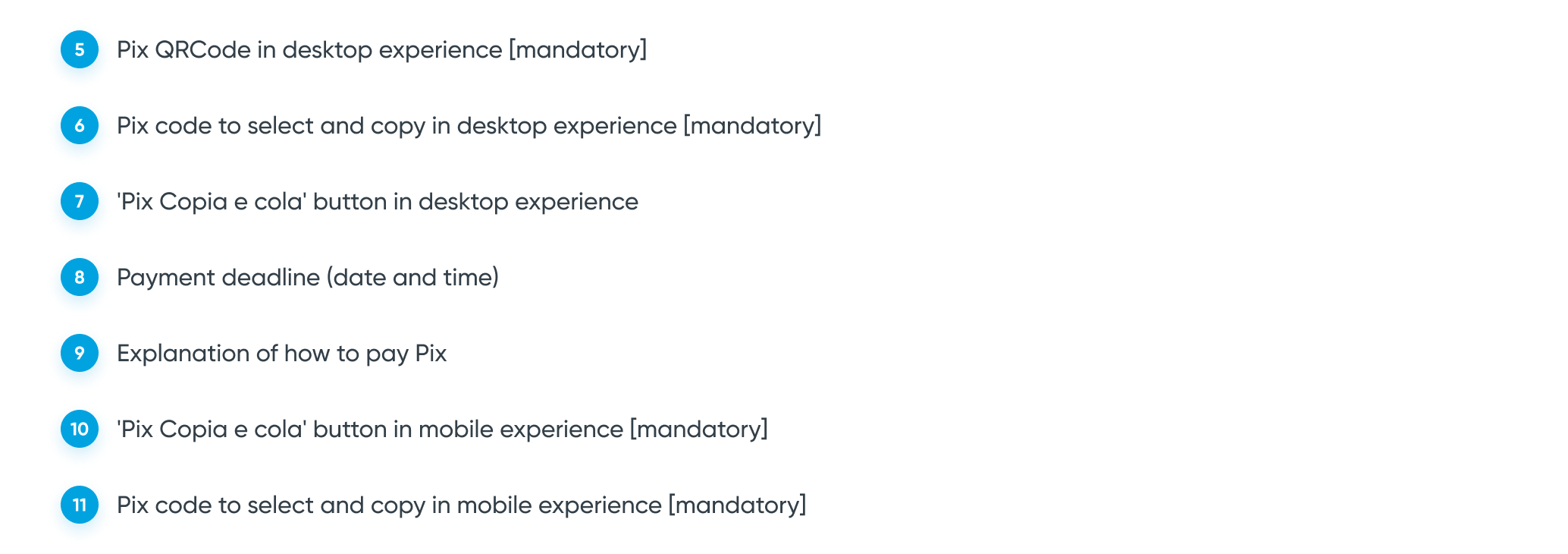
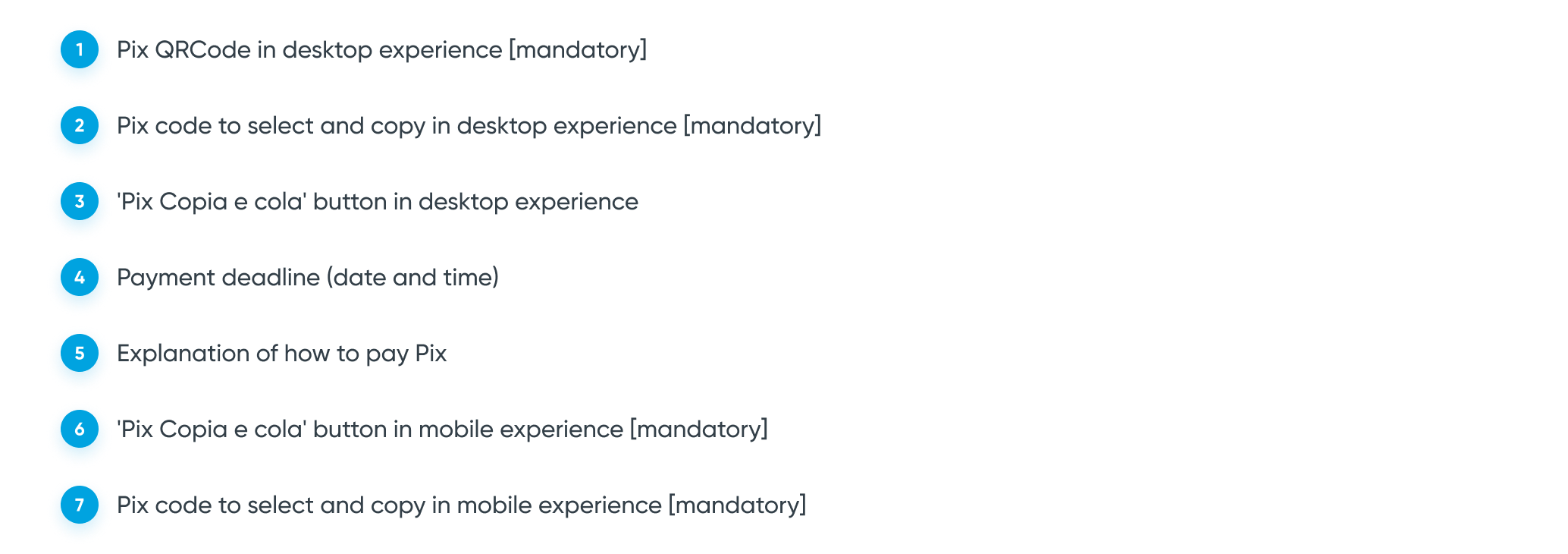
Desktop experience: It's mandatory to have the Pix QR Code and the Pix code to select and copy. It's not mandatory, but it's best practice to have the button 'Pix Copia e cola' (Copy and paste).
Mobile experience: It's mandatory to have the Pix code to select and copy and the button 'Pix Copia e cola' (Pix Copy and paste).
'Pix Copia e cola' is the feature name, so it should be spelled that way.
It's a good user experience that the confirmation page shows the payment deadline with a date and time, as well as a brief explanation of how to pay Pix.

When the user pays the Pix code while in the checkout flow, it is important that the confirmation page is updated, giving the user feedback that the Pix payment has been confirmed. Remember that Pix is an instant payment and takes a few seconds to process.


The Pix payment in 'My orders'
It may happen that the user does not pay the Pix immediately and may leave your website and the confirmation page at checkout. It is very important to ensure that this user can access the Pix code in these situations. So, we recommend that the Pix code and the deadline for payment are also available on the page where the user follows their order, 'My orders'.
The page 'My orders' usually shows information about the purchase and it would be good practice to have user-accessible Pix code.
Desktop experience: It's nice to have the Pix QR Code, the Pix code to select and copy and the button 'Pix Copia e cola' (Pix Copy and paste).
Mobile experience: It could have the Pix code to select and copy and the button 'Pix Copia e cola' (Pix Copy and paste).
It's a good user experience that the 'My orders' page shows the payment deadline with a date and time, as well as a brief explanation of how to pay Pix.
Just like on the checkout page, the My Orders page should update when the user pays Pix code, instantly giving feedback to the user that Pix payment has been confirmed.


Pix code by email (coming soon)
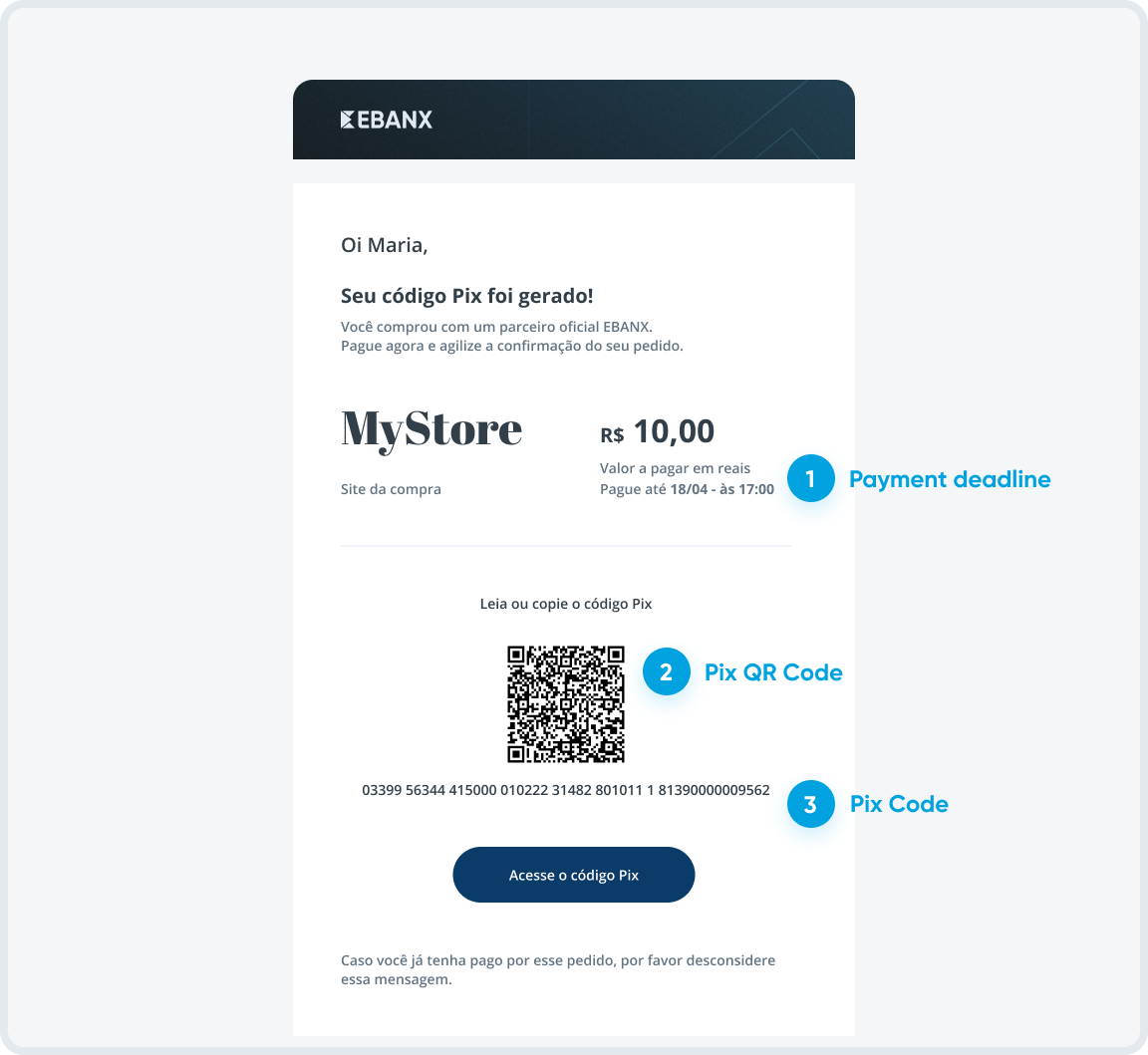
To ensure that the user can access the Pix code even if they accidentally leave the checkout without paying, we are implementing an email with the Pix Code, QR Code and deadline for payment, as another way to communicate and remind the user about the Pix payment.
For more information regarding the Pix UX Recommendations, you can access Brazilian Central Bank’s official website and also check more Pix Brand Guide from the EBANX Design Team.